Table of Contents
- The ASO Struggle Nobody Talks About
- Why Most ASO Tools Don’t Work for Indie Developers
- What Actually Makes the Best ASO Tool in 2026?
- The Problem with Expensive ASO Subscriptions
- A Free, Unlimited ASO Tool Built by an Indie Founder
- How the RankMyApps ASO Tool Actually Works
- App Store vs. Google Play: Why You Need Platform-Specific Optimization
- When Should You Start Optimizing Your App Store Listing?
- FAQ
The ASO Struggle Nobody Talks About
If you’ve ever typed “what is the best ASO tool” into Google at 1am, frustrated after your app launch flopped, you’re not alone. I’ve been there. Multiple times, actually.
I’ve shipped four apps over the past few years. Some did okay. Some disappeared into the void of page 47 in search results, never to be seen by a human being. And every single time an app underperformed, I eventually traced part of the problem back to the same place: my App Store listing was mediocre, and I didn’t have the right tools to fix it.
Here’s the thing about 2026. The app stores are more crowded than they’ve ever been. Apple announced over 1.8 million active apps on the App Store. Google Play has even more. If you’re an indie developer, you’re competing against teams with full-time ASO specialists, marketing budgets, and enterprise tools that cost more per month than your entire app makes in a year.
So the question isn’t really whether ASO matters. Everyone knows it matters. The real question is: how do you actually do it well when you’re working alone, on a budget, and already stretched thin between coding, design, support, and trying to have a life?
That’s what this article is about. Not theory. Not a listicle of ten tools you’ll never use. I want to walk through what I’ve actually learned about ASO tools, what’s broken about most of them, and what I think is the best option available to indie developers right now.
Why Most ASO Tools Don’t Work for Indie Developers
I’ve tried a lot of ASO tools. Paid ones. Free trials. Enterprise platforms that let you poke around for 7 days before asking for your credit card. And here’s the pattern I kept running into.
They’re built for agencies, not for you.
Most ASO platforms are designed for teams managing dozens or hundreds of apps. They have dashboards with 14 tabs. They show you keyword difficulty scores, competitor matrices, trend graphs, localization pipelines. It’s impressive software. But if you’re a solo developer trying to optimize one app, it’s like using a commercial kitchen to make toast.
You don’t need a competitor intelligence dashboard. You need a good title and a description that actually converts.
The pricing is absurd for small developers.
I’m not going to name specific tools here, but you know the ones. $50/month on the low end. $100–$200/month for anything useful. Some of the popular platforms charge $300+ if you want access to AI features or more than a handful of keyword lookups per day.
When your app is making $200/month in revenue, spending $100 on an ASO tool doesn’t make sense. The math just doesn’t work.
Free tiers are a joke.
Most “free” plans give you something like 3 keyword searches per day, no AI features, and a watermark on exported reports (as if you’re presenting ASO reports to a board of directors). They exist to get you into the funnel, not to actually help you.
They give you data, not answers.
This is the big one. Most ASO tools are analytics platforms. They’ll tell you that a keyword has a search score of 47 and a difficulty of 62. Cool. Now what? You still have to figure out how to weave that into a title that’s under 30 characters, sounds natural, and doesn’t violate Apple’s App Store product page guidelines. That’s the hard part. That’s the part where most tools leave you hanging.
What Actually Makes the Best ASO Tool in 2026?
After years of testing and a fair amount of wasted money, I’ve come to a pretty clear conclusion about what the best ASO tool actually needs to do. Not what would be nice. What’s essential.
It needs to generate store-ready output. Not keyword suggestions. Not “content ideas.” Actual titles, subtitles, and full descriptions that you can paste into App Store Connect or Google Play Console and publish. The gap between “here are some keywords” and “here’s your optimized listing” is enormous, and most tools stop at the first part.
It needs AI that understands ASO specifically. Generic AI can write you a description. But it won’t know that Apple’s subtitle has a 30-character limit. It won’t know that Google Play’s short description works differently than Apple’s subtitle. It won’t understand keyword density norms for app store algorithms versus web search. ASO is its own discipline, and the AI behind the tool needs to be trained for it.
It needs to work for both platforms. If you’re shipping on iOS and Android (and in 2026, most indie devs are), you shouldn’t need two different tools. App Store and Google Play have different optimization rules, different character limits, and different ranking factors. A good tool handles both, with platform-specific output. Google’s own documentation on store listing optimization makes it clear how different their approach is from Apple’s.
It needs to be fast. If optimizing a listing takes 45 minutes of navigating dashboards, you’re going to put it off. And then you’ll never do it. The best tool is one you actually use.
It needs to be affordable. For indie developers, that really means free. Not “free trial.” Not “free with limits that make it useless.” Actually free.
And it needs to be unlimited. Because you’re going to iterate. You’re going to test different titles. You’re going to optimize for different keywords. You’re going to localize. You can’t do that if you’re counting your remaining credits.
The Problem with Expensive ASO Subscriptions
I want to spend a minute on this because I think the subscription model has genuinely hurt indie developers when it comes to ASO.
Here’s what happens. You launch an app. You know your listing needs work. You sign up for an ASO tool. You pay $70/month. You use it heavily for the first week, maybe generate some keywords, tweak your listing. Then life happens. You get busy with a bug fix. You don’t log in for three weeks. The subscription renews. You’ve now paid $140 for what amounted to maybe two hours of actual use.
I’ve done this. More than once. And every time, the return on investment was questionable at best.
The subscription model works for agencies managing 50 client apps. It doesn’t work for someone with one or two apps who needs to optimize their listing a few times a year and maybe do a bigger overhaul during seasonal pushes.
What indie developers actually need is a tool that’s there when you need it, doesn’t charge you when you don’t, and doesn’t make you feel like you have to “get your money’s worth” every month.
A Free, Unlimited ASO Tool Built by an Indie Founder
Alright, so here’s where I tell you what I’ve been using and why I think it’s the best option out there right now, especially if you’re indie.
Earlier this year I came across RankMyApps’ free ASO tool. I’ll be honest, I was skeptical. “Free and unlimited” usually means “bad and hoping you’ll upgrade.” But I gave it a shot because I had nothing to lose, and I was tired of paying for tools that gave me spreadsheets instead of solutions.
It’s genuinely different from what I’ve used before, and here’s why.
It’s actually free. And actually unlimited. No credit card. No trial period. No “5 generations per day” nonsense. You use it as much as you want. I’ve gone back to it dozens of times to test different keyword combinations and iterate on listings, and I’ve never hit a wall.
The AI is trained specifically for ASO. This matters more than people realize. I’ve tried using ChatGPT and other general-purpose AI to write app descriptions. The output is fine as generic copy, but it doesn’t understand App Store character limits, keyword placement strategy, or the subtle differences between how Apple and Google index metadata. The AI behind RankMyApps clearly does. The output comes back formatted correctly, within character limits, and structured the way the stores expect.
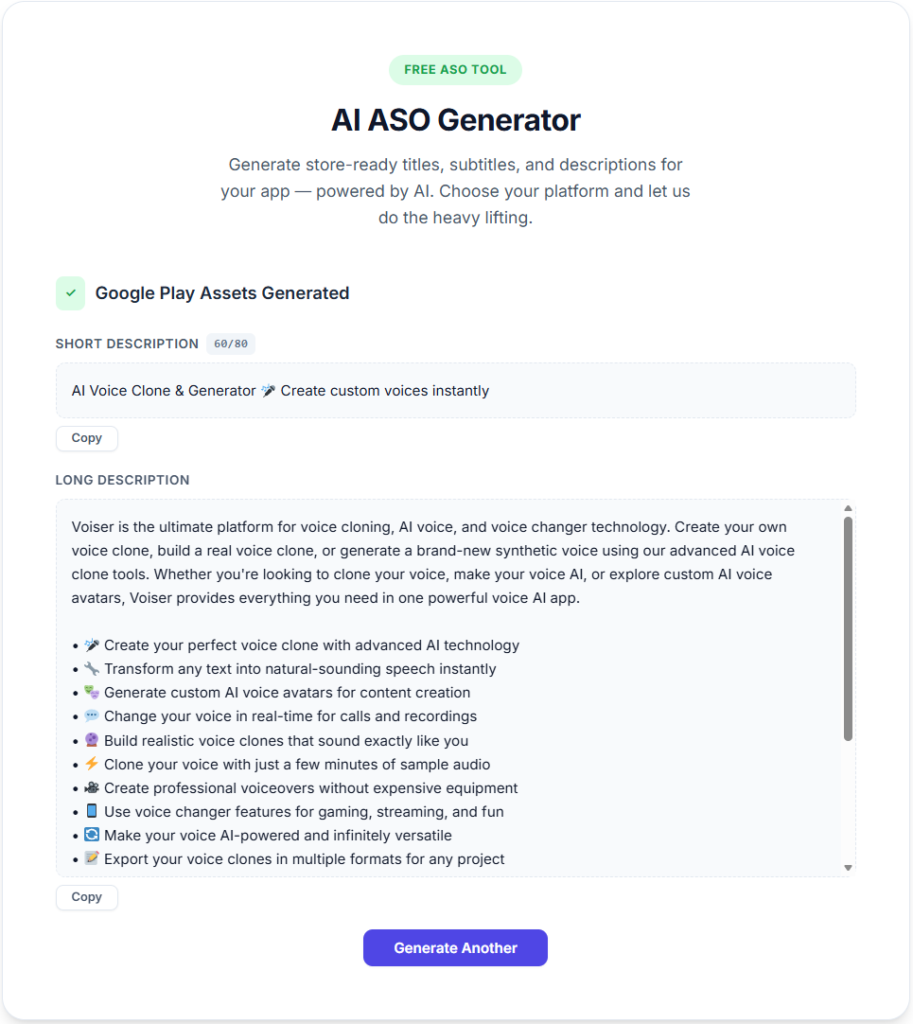
It generates complete, store-ready listings. Titles. Subtitles. Full descriptions. For both App Store and Google Play, with platform-specific formatting. You put in your app details and keywords, and you get back a listing you can actually use. Not a brainstorming session. Not a keyword cloud. A real listing.
There’s no complicated dashboard. It’s a tool, not a platform. You don’t need to “learn” it. There’s no onboarding flow or tutorial video. You open it, you use it, you get your output. That might sound like a small thing, but when you’re context-switching between Xcode, your analytics, your support inbox, and your marketing, simplicity is everything.
It was built by an indie founder. I know this because I looked into it. And honestly, you can tell. The tool solves the exact problem that indie developers actually have, which is: “I need a good App Store listing and I don’t have time or money to figure it out from scratch.” It’s not trying to be an enterprise analytics platform. It’s trying to help you ship a better listing today.
After Generating ASO Assets
How the RankMyApps ASO Tool Actually Works
Since this is meant to be practical, let me walk through what using it actually looks like.
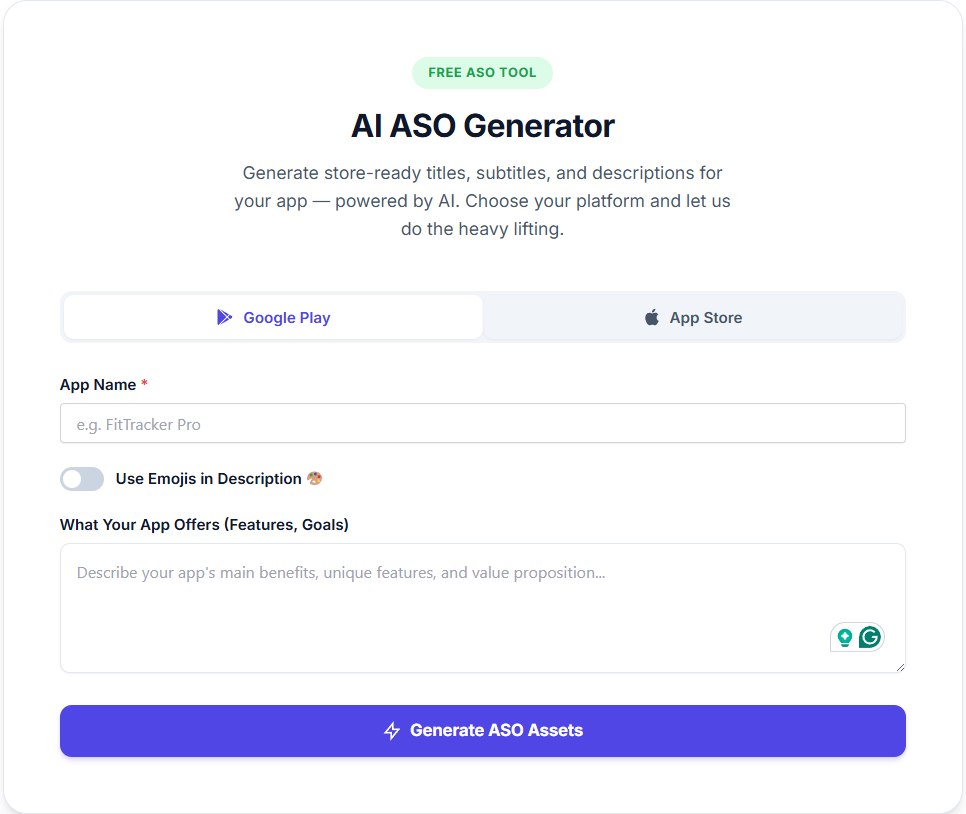
You go to the tool, enter your app’s core information — what it does, who it’s for, and the keywords you want to target. The AI then generates optimized metadata for whichever platform you’re targeting.
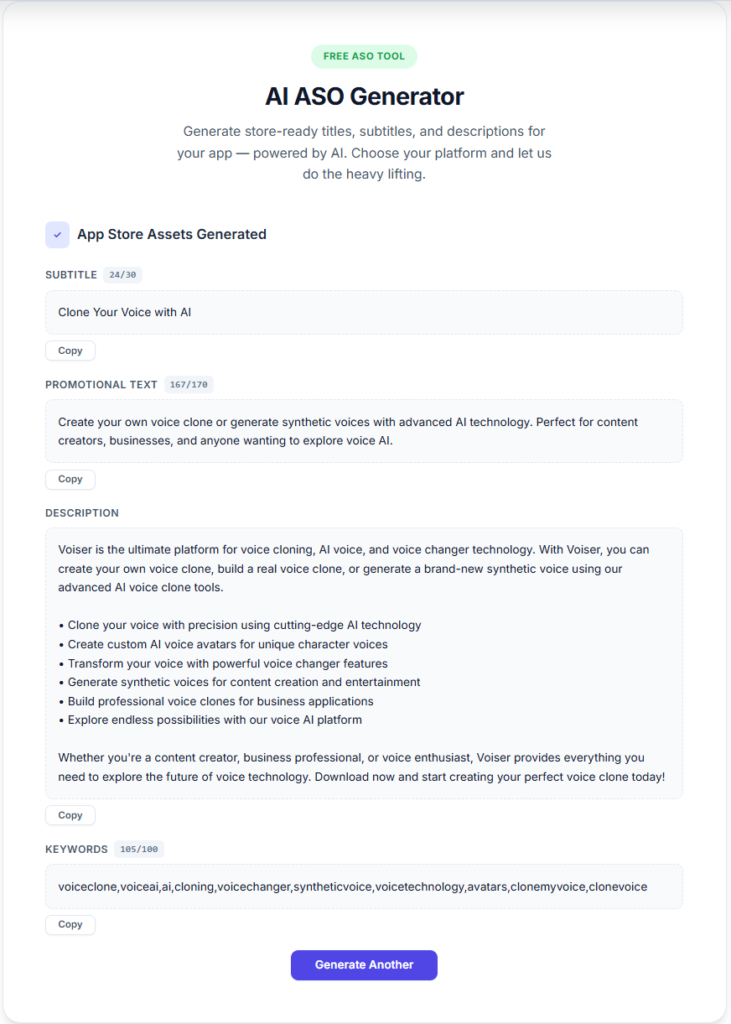
For iOS, you get a title (within the 30-character limit), a subtitle, and a full description with proper formatting. For Google Play, you get a title (within the 50-character limit), a short description, and a full description that accounts for Google’s different approach to keyword indexing.
The output isn’t just “keyword-stuffed copy.” It reads naturally. It’s the kind of listing that a real person would read and understand. That matters because conversion rate — the percentage of people who view your listing and actually download — is just as important as ranking for the right keywords.
You can iterate as many times as you want. Don’t like the first version? Tweak your keywords and generate again. Want to test a completely different positioning angle? Go for it. There’s no cost and no limit, so you can experiment freely.
App Store vs. Google Play: Why You Need Platform-Specific Optimization
This is something a lot of indie developers get wrong, and I got it wrong for years too.
Apple’s App Store and Google Play rank apps differently. Apple has a dedicated keyword field (100 characters) that’s invisible to users. Your title and subtitle carry heavy weight, but the keyword field is where a lot of the magic happens. Apple’s App Store optimization resources explain how discovery works, and it’s worth reading if you haven’t.
Google Play, on the other hand, indexes the actual text in your description. Keyword placement in your long description directly affects your ranking. There’s no hidden keyword field. Your short description also matters for ranking, not just conversion.
This means you can’t just write one listing and use it for both stores. Or rather, you can, but you’ll be leaving downloads on the table. A good ASO tool for both App Store and Google Play needs to understand these differences and generate output accordingly.
This is one of the areas where RankMyApps stands out. You choose your platform, and the output is tailored for it. It’s a small thing that makes a big difference.
When Should You Start Optimizing Your App Store Listing?
Yesterday. Seriously.
If your app is already live and you haven’t touched your listing since launch, you’re probably ranking worse than you should be. App store algorithms reward relevant, well-structured metadata. Even small changes to your title or description can move the needle.
If you haven’t launched yet, optimize before you ship. Your day-one listing affects your initial ranking, and early momentum matters more than most people think.
And if you’re doing seasonal updates, feature launches, or responding to new competitors, revisit your listing. ASO isn’t a one-time task. It’s ongoing. Which is another reason why having an unlimited, free tool matters — you should be iterating regularly, not treating optimization as a once-a-year event.
FAQ
What is the best ASO tool for indie developers in 2026?
Based on my experience, the best option for indie developers right now is RankMyApps’ free ASO tool. It’s free, unlimited, powered by an AI trained specifically for ASO, and generates store-ready listings for both iOS and Android. For solo developers who need results without complexity or cost, it’s the most practical choice available.
Are free ASO tools actually good enough?
They used to not be. Most free ASO tools in previous years were either severely limited or just gave you basic keyword suggestions. That’s changed. AI-powered tools like RankMyApps can now generate complete, optimized listings that rival what you’d get from a paid consultant. The key is whether the AI behind the tool actually understands ASO, and not all of them do.
Do I need separate ASO tools for App Store and Google Play?
You don’t need separate tools, but you do need a tool that generates platform-specific output. Apple and Google rank apps using different signals and have different character limits and metadata fields. A good ASO tool handles both. RankMyApps lets you choose your target platform and generates output formatted for that specific store.
How often should I update my ASO?
At minimum, revisit your listing every time you push a significant update. Ideally, you should be testing and iterating on your keywords and listing copy every few months, or whenever you notice changes in your ranking or conversion rate. Because app store trends and competitor behavior shift constantly, treating ASO as a one-time task is a common mistake.
Can I just use ChatGPT or generic AI to write my App Store listing?
You can, and the output will be decent. But generic AI doesn’t understand App Store character limits, keyword field strategy, Google Play indexing behavior, or ASO-specific best practices out of the box. You’ll spend a lot of time prompting and correcting. A purpose-built ASO tool saves that time and gets you better results on the first try.